Rendering and hosting
VTK draws with OpenGL, into a window of its own, a window the application gives it, or an offscreen buffer.
Off the screen
using var window = new vtkRenderWindow();
window.SetOffScreenRendering(1);
window.SetSize(640, 480);
window.AddRenderer(renderer);

// the camera looks at everything, from a little above
renderer.ResetCamera();
using (var camera = renderer.GetActiveCamera())
{
  camera.Elevation(20);
  camera.Zoom(1.2);
}

window.Render();

// the picture as image data: 640 x 480 points, an RGB tuple each
using var grab = new vtkWindowToImageFilter();
grab.SetInput(window);
grab.SetInputBufferTypeToRGB();
grab.ReadFrontBufferOff();
grab.Update();
using var image = grab.GetOutput();
int[] size = image.GetDimensions();
The image's scalars are the pixels: vtkUnsignedCharArray.ToArray() copies them, as in Getting started. Rendering needs OpenGL 3.2: a GPU's driver, or Mesa's llvmpipe (on Linux, under Xvfb).
Volumes
An image's values drawn as a volume, through transfer functions for opacity and colour:
// transfer functions: the value's opacity and colour, transparent black to opaque red
using var opacity = new vtkPiecewiseFunction();
opacity.AddPoint(0, 0);
opacity.AddPoint(31, 1);
using var color = new vtkColorTransferFunction();
color.AddRGBPoint(0, 0, 0, 0);
color.AddRGBPoint(31, 1, 0, 0);
using var property = new vtkVolumeProperty();
property.SetScalarOpacity(opacity);
property.SetColor(color);

// the mapper ray-casts on the GPU where it can, on the CPU otherwise
using var mapper = new vtkSmartVolumeMapper();
mapper.SetInputData(image);
using var volume = new vtkVolume();
volume.SetMapper(mapper);
volume.SetProperty(property);
renderer.AddVolume(volume);
renderer.ResetCamera();
window.Render();
vtkGPUVolumeRayCastMapper.New() and vtkFixedPointVolumeRayCastMapper pick one way to draw; vtkSmartVolumeMapper picks for the GPU at hand. Unstructured grids go through vtkUnstructuredGridVolumeRayCastMapper or vtkProjectedTetrahedraMapper.
In an application's window
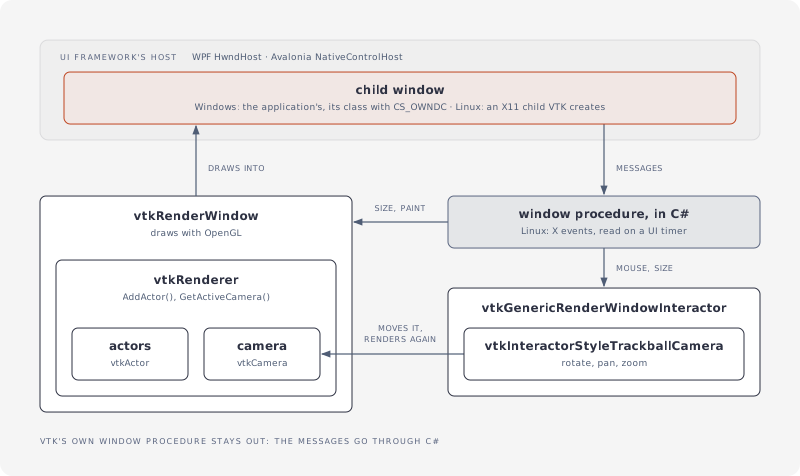
The application makes a child window (an HWND on Windows); VTK's render window draws into it, and VTK's interactor gets the window's size, paint and mouse messages from C#:
// VTK drawing into a child window the application made (an HWND on Windows), its mouse input fed
// from the window's messages; create, use and dispose it on the UI thread
public sealed class HostedView : IDisposable
{
  private readonly vtkRenderWindow _window = new();
  private readonly vtkGenericRenderWindowInteractor _interactor = new();
  private readonly vtkInteractorStyleTrackballCamera _style = new();

  public HostedView(IntPtr handle)
  {
    _window.SetWindowId(handle);
    _window.AddRenderer(Renderer);
    _interactor.SetRenderWindow(_window);
    _interactor.SetInteractorStyle(_style);
    _interactor.Initialize();
  }

  public vtkRenderer Renderer { get; } = new();

  // once, on the UI thread: VTK's messages to C#, the finalizer's releases to this thread
  public static void InitializeOnUiThread()
  {
    VtkOutput.Install();
    VtkFinalizer.Context = SynchronizationContext.Current;
  }

  // the window's size and paint messages
  public void Resize(int width, int height)
  {
    _window.SetSize(width, height);
    _interactor.UpdateSize(width, height);
  }

  public void Paint() => _window.Render();

  // its mouse messages, in the window's pixels (y down): the style rotates, pans and zooms
  public void LeftButtonDown(int x, int y)
  {
    _interactor.SetEventInformationFlipY(x, y);
    _interactor.LeftButtonPressEvent();
  }

  public void MouseMove(int x, int y)
  {
    _interactor.SetEventInformationFlipY(x, y);
    _interactor.MouseMoveEvent();
  }

  public void LeftButtonUp(int x, int y)
  {
    _interactor.SetEventInformationFlipY(x, y);
    _interactor.LeftButtonReleaseEvent();
  }

  // before the window goes: the render window last, its OpenGL context with it
  public void Dispose()
  {
    _interactor.Dispose();
    _style.Dispose();
    Renderer.Dispose();
    _window.Dispose();
  }
}
- WPF: an
HwndHostcreates the child window inBuildWindowCore. - Avalonia: a
NativeControlHostcreates it inCreateNativeControlCore, after the window shows. - The window class has
CS_OWNDC: OpenGL needs its own device context. Its procedure calls the view; VTK's own window procedure stays out, so an exception a C# observer throws comes back to C#.
The demos do all of this in a WPF and an Avalonia 12 viewer that open .vtu results; NetVtk.Viewer holds the shared part (VtkViewer, ViewerWindow).
Linux (X11): Avalonia's NativeControlHost gives an X11 window id. On a display connection the application opens and hands to VTK (SetDisplayId), VTK creates the child window there itself (SetParentId, Initialize, then GetGenericWindowId()), with the visual its OpenGL context needs; the application selects the window's mouse and structure events on that connection and passes them on to VTK's interactor, polling from a UI timer. The demos' X11ViewerWindow does this; its test draws into a host's X11 window under Xvfb. macOS (an NSView child) isn't done yet.
The rendering thread
Render windows, renderers, mappers, actors and textures release OpenGL resources when they go, which needs the thread that renders: create, use and dispose them there, the render window last. For what the garbage collector finalizes, set VtkFinalizer.Context on that thread, as InitializeOnUiThread above does: the finalizer then posts the releases to it. See Object lifetimes.