Results
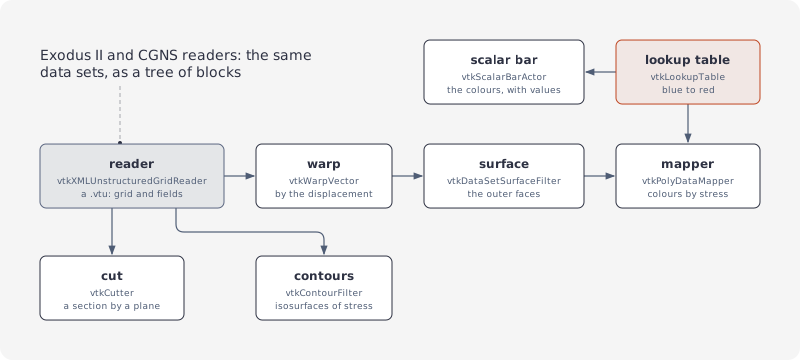
A recipe for simulation results: read a .vtu, colour its surface by a field with a scalar bar, cut it, contour it, warp it. The samples' result is a cantilever beam: 160 hexahedra, clamped at x = 0 and bent down by a load at its tip, with the point fields displacement (a vector) and stress.
Reading
using var reader = new vtkXMLUnstructuredGridReader();
reader.SetFileName("result.vtu");
reader.Update();
using var grid = reader.GetOutput();
using var points = grid.GetPointData();
using var stress = points.GetArray("stress");
double[] values = stress.ToDoubleArray();
A legacy .vtk file reads the same way through vtkUnstructuredGridReader. A file that doesn't read reports an error and leaves the output empty; it throws nothing, see Observers and messages.
Exodus II and CGNS
Solvers' own formats read into the same data sets, as a tree of blocks (vtkMultiBlockDataSet):
// the result as an Exodus II file
using (var writer = new vtkExodusIIWriter())
{
  writer.SetFileName("result.exo");
  writer.SetInputData(grid);
  writer.Write();
}

// and read back, every point field with it
using var exodus = new vtkExodusIIReader();
exodus.SetFileName("result.exo");
exodus.UpdateInformation();
exodus.SetAllArrayStatus((int)vtkExodusIIReader_ObjectType.NODAL, 1);
exodus.Update();

// a tree of blocks: the element blocks first, then each block's grid
using var output = exodus.GetOutput();
using var elementBlocks = vtkMultiBlockDataSet.SafeDownCast(output.GetBlock(0));
using var block = vtkUnstructuredGrid.SafeDownCast(elementBlocks.GetBlock(0));
vtkCGNSReader reads CGNS files alike: SetFileName, EnableAllPointArrays (or EnableAllCellArrays), Update; its output's blocks are the file's bases and their zones. NewIterator() on the output walks the leaves, whatever the tree. VTK writes no CGNS.
Fields
// each field an array: a tuple per point, of 1 component (a scalar) or 3 (a vector)
var fields = new List<string>();
using var points = grid.GetPointData();
for (var i = 0; i < points.GetNumberOfArrays(); i++)
{
  using var array = points.GetArray(i);
  fields.Add(
    $"{array.GetName()}: {array.GetNumberOfTuples()} x {array.GetNumberOfComponents()}");
}
Colouring by a field
// the grid's outer faces, which a polydata mapper draws
using var surface = new vtkDataSetSurfaceFilter();
surface.SetInputConnection(readerPort);
surface.Update();
using var faces = surface.GetOutput();
using var faceData = faces.GetPointData();
using var stress = faceData.GetArray("stress");
double[] range = stress.GetRange();

// blue at the field's smallest value, red at its largest
using var colors = new vtkLookupTable();
colors.SetHueRange(0.667, 0.0);
colors.SetRange(range[0], range[1]);
colors.Build();

using var mapper = new vtkPolyDataMapper();
using var surfacePort = surface.GetOutputPort();
mapper.SetInputConnection(surfacePort);
mapper.SetLookupTable(colors);
mapper.UseLookupTableScalarRangeOn();
mapper.SetScalarModeToUsePointFieldData();
mapper.SelectColorArray("stress");
using var actor = new vtkActor();
actor.SetMapper(mapper);
vtkDataSetSurfaceFiltergives the grid's outer faces, with their fields, for a polydata mapper to draw.SetScalarModeToUsePointFieldDataandSelectColorArraypick the field by name;UseLookupTableScalarRangeOnkeeps the table's range.
Scalar bar
// the colours and their values, in the renderer's corner
using var bar = new vtkScalarBarActor();
bar.SetLookupTable(colors);
bar.SetTitle("stress (MPa)");
bar.SetNumberOfLabels(5);

using var renderer = new vtkRenderer();
renderer.AddActor(actor);
renderer.AddViewProp(bar);
Cut
// a section across the beam at x = 5.25: the field interpolated onto it
using var plane = new vtkPlane();
plane.SetOrigin(5.25, 0, 0);
plane.SetNormal(1, 0, 0);
using var cutter = new vtkCutter();
cutter.SetCutFunction(plane);
cutter.SetInputConnection(readerPort);
cutter.Update();
using var section = cutter.GetOutput();
The section carries the fields, interpolated: draw it with a mapper of its own and the same lookup table.
Contours
// isosurfaces of the stress at -2400, -1600, ..., 2400, each carrying its value
using var contours = new vtkContourFilter();
contours.SetInputConnection(readerPort);
contours.SetInputArrayToProcess(
  "stress", (int)vtkDataObject_FieldAssociations.FIELD_ASSOCIATION_POINTS);
contours.GenerateValues(7, -2400, 2400);
contours.ComputeScalarsOn();
contours.Update();
using var isosurfaces = contours.GetOutput();
GenerateValues(n, first, last) spaces n values evenly, both ends included.
Warp
// the points moved by twice their displacement, so the bending shows
using var warp = new vtkWarpVector();
warp.SetInputConnection(readerPort);
warp.SetInputArrayToProcess("displacement",
                            (int)vtkDataObject_FieldAssociations.FIELD_ASSOCIATION_POINTS);
warp.SetScaleFactor(2);

// what showed the grid, now on the warp's output
using var surface = new vtkDataSetSurfaceFilter();
using var warpPort = warp.GetOutputPort();
surface.SetInputConnection(warpPort);
surface.Update();
using var bent = surface.GetOutput();
All together
The demos' viewer builds this pipeline once (ResultScene in NetVtk.Viewer) and switches its parts: the warp, the field with its scalar bar, a cut plane across the longest axis, contours, the surface see-through while a cut or contours show. It also colours by cell fields (SetScalarModeToUseCellFieldData), contours them after vtkCellDataToPointData, and colours vectors by their magnitude (SetVectorModeToMagnitude on the lookup table, the range from GetRange(-1)).