Pipelines
Sources and readers make data, filters change it, mappers draw it: VTK's pipeline, in C# as in C++.
Sources
// a source makes data: here a sphere's triangles
using var sphere = new vtkSphereSource();
sphere.SetRadius(2);
sphere.SetThetaResolution(16);
sphere.SetPhiResolution(8);
sphere.Update();
using var polyData = sphere.GetOutput();
long points = polyData.GetNumberOfPoints();
long triangles = polyData.GetNumberOfPolys();
Counts and ids are long: VTK's vtkIdType, 64 bits on every platform.
Connecting filters
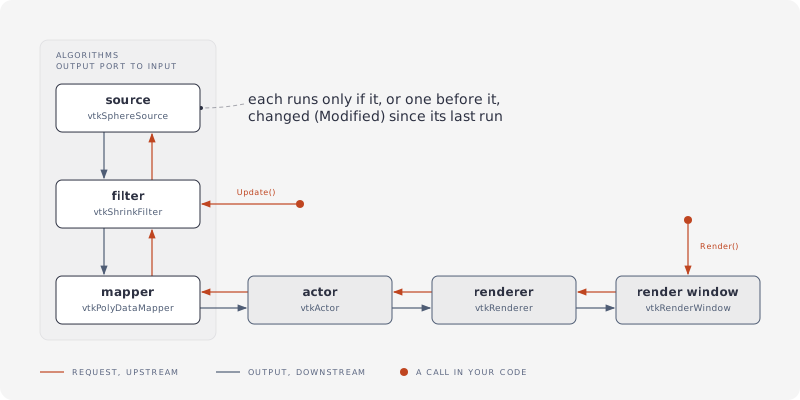
A filter's input is another algorithm's output port. Nothing runs until Update() (or a render) asks for output; then each algorithm runs if it or something before it changed since its last run:
// a filter's input is another's output port: sphere -> elevation -> shrink
using var sphere = new vtkSphereSource();
using var elevation = new vtkElevationFilter();
using var spherePort = sphere.GetOutputPort();
elevation.SetInputConnection(spherePort);
using var shrink = new vtkShrinkFilter();
using var elevationPort = elevation.GetOutputPort();
shrink.SetInputConnection(elevationPort);

// nothing has run yet: Update on the last one runs all three
shrink.Update();
using var shrunk = shrink.GetOutput(); // a vtkUnstructuredGrid
long before = shrunk.GetNumberOfCells();

// a changed parameter marks the sphere modified: the next Update runs it and what follows
sphere.SetThetaResolution(32);
shrink.Update();
long after = shrunk.GetNumberOfCells();
GetOutput() gives the same data object after each run, updated in place.
Data no algorithm made goes in with SetInputData:
// data no algorithm made (built in C#, read earlier): SetInputData instead of a port
using var normals = new vtkPolyDataNormals();
normals.SetInputData(polyData);
normals.Update();
using var withNormals = normals.GetOutput();
using var pointData = withNormals.GetPointData();
using var normalArray = pointData.GetNormals();
Drawing
// a mapper turns data into graphics, an actor places it with its look, a renderer holds actors
using var mapper = new vtkPolyDataMapper();
using var port = sphere.GetOutputPort();
mapper.SetInputConnection(port);
using var actor = new vtkActor();
actor.SetMapper(mapper);
actor.SetPosition(0, 0, 1);
using (var look = actor.GetProperty())
{
  look.SetColor(1.0, 0.5, 0.0); // orange
  look.SetOpacity(0.5);
}

using var renderer = new vtkRenderer();
renderer.AddActor(actor);
renderer.SetBackground(1, 1, 1);
The renderer draws once a render window holds it: Rendering and hosting.
From C++
| C++ | C# |
|---|---|
vtkNew<vtkSphereSource> sphere; |
using var sphere = new vtkSphereSource(); |
auto sphere = vtkSmartPointer<vtkSphereSource>::New(); |
the same, or vtkSphereSource.New() |
sphere->SetRadius(2); |
sphere.SetRadius(2); |
filter->SetInputConnection(sphere->GetOutputPort()); |
using var port = sphere.GetOutputPort();filter.SetInputConnection(port); |
vtkPolyData* output = filter->GetOutput(); |
using var output = filter.GetOutput(); |
double* bounds = output->GetBounds(); |
double[] bounds = output.GetBounds(); |
actor->GetProperty()->SetColor(1, 0, 0); |
using (var look = actor.GetProperty()) look.SetColor(1, 0, 0); |
vtkPolyData::SafeDownCast(object) |
vtkPolyData.SafeDownCast(object): null if it isn't one |
Each returned object is a new proxy holding a reference: using drops it at once, otherwise the finalizer does. Chained calls (actor.GetProperty().SetColor(...)) leave theirs to the finalizer: fine for data, not for rendering objects, see Object lifetimes.